RDBMS: Understanding SQL Joins.
RDBMS (relational database management systems) store large volumes of data organized in tables, and analyzing data from multiple tables simultaneously is a common task. It's crucial to have efficient methods that enable users to extract records from two or more tables based on specific criteria. The JOIN clause addresses this need by fetching data from multiple tables through a shared column.
This tutorial uses the database system MariaDB. The general principles should apply to other RDBMS, too. However, it is not to exclude that the syntax of the SQL statements used here work as such with other database systems (?). Also note, that the reader is supposed to have a basic to intermediate knowledge of RDBMS and the SQL language.
The elementary database, that I use for the tutorial is called "company". It consists of two tables, called "departments" and "employees". The screenshots below show the structure of these tables (column definitions and indexes) in phpMyAdmin.
![SQL Joins: Sample database table structure [1]](../screenshots/sql_joins1a.jpg "SQL Joins: Sample database table structure [1]") |
![SQL Joins: Sample database table structure [2]](../screenshots/sql_joins1b.jpg "SQL Joins: Sample database table structure [2]") |
On the first screenshot, you can see that the primary key of the "departments" table is a two-characters ID (actually the two first letters of the department name). The unique index on the employee_name column ensures that you can't have several departments with the same name.
On the second screenshot, you can see that the primary key of the "employees" table is an integer number. Normally, its only purpose would be to give the table a primary key; however, it becomes important in the tutorial "self joins" examples. For the "two tables" examples, the important feature of the "employees" table is the foreign key, that defines the relationship between the two tables. This relationship is defined by the department ID, content of a common column, called "employee_department" in the "employees" table, and called "department_id" in the "departments" table. With the update and delete options of the foreign key set both to RESTRICT, the database engine will neither allow to add a department ID in the "employees" table, that does not already exists in the "departments" table, nor allow to delete a record from the "departments" table, if there are still records with that department ID in the "employees" table. This is what is commonly called referential integrity.
Another important point is that the value of the "employee_department" field is set to be allowed to be NULL. This gives us the possibility to add employees without entering a department ID. In practice, this might correspond to new employees, who haven't yet been affected to a department.
Click the following link to download the SQL to create the tables and indexes, to fill the tables with some test data, and to run the SELECT queries, described further down in the text. In phpMyAdmin (or any other SQL GUI client), create the database "company" (with all default options). Then, copy/paste the content of the files departments.sql and employees.sql (in this order!) in the SQL tab of the GUI client; if you use phpMyAdmin, it should be possible to use the IMPORT feature (with all default settings) instead.
The two screenshots below show the content of the "departments" resp. "employees" tables.
![SQL Joins: Sample database table content [1]](../screenshots/sql_joins2a.jpg "SQL Joins: Sample database table content [1]") |
![SQL Joins: Sample database table content [2]](../screenshots/sql_joins2b.jpg "SQL Joins: Sample database table content [2]") |
Note that there are two employees, who haven't yet been affected to a department (their foreign key field being set to NULL). Also note that there are no employees affected to the "Marketing" department. In practice, this might correspond to a department that is under creation only.
If we want to print a list of all employees with the name of the department that they are affected to, we'll have to select data from both tables (the employees' data
from the "employees" table, and the department name from the "departments" table). I suppose that you know how to do this using a WHERE clause:
SELECT employee_lname AS 'Last name', employee_fname AS 'First name', department_name AS 'Department'
FROM employees, departments
WHERE employee_department = department_id
ORDER BY employee_lname, employee_fname;
The screenshot shows the query output (dataset returned):
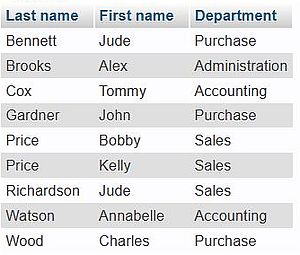 |
Do you notice? The result set only includes data about employees, who have been affected to a department, and only includes the departments, that have some employees affected to. In other words, neither the department, that hasn't (yet) any employees affected to, nor the employees, who aren't (yet) affected to a department, are part of this query's result set!
Inner joins.
Definition:
| An inner join between two tables returns those records, that have matching values in both tables. |
SQL for the employees with the name of the department, that they are affected to:
SELECT employee_lname AS 'Last name', employee_fname AS 'First name', department_name AS 'Department'
FROM employees
INNER JOIN departments
ON employee_department = department_id
ORDER BY employee_lname, employee_fname;
Note that this inner join returns the same record set as the one returned when using the WHERE clause above.
Left joins.
Definition:
| A left join between two tables returns all records from the left table and matched records from the right table. |
SQL for the employees with the name of the department, that they are affected to:
SELECT employee_lname AS 'Last name', employee_fname AS 'First name', department_name AS 'Department'
FROM employees
LEFT JOIN departments
ON employee_department = department_id
ORDER BY employee_lname, employee_fname;
The screenshot shows the query output:
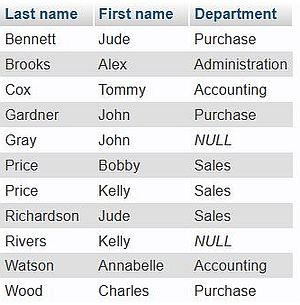 |
As you can see, the dataset returned includes now all employees, even those who haven't (yet) been affected to a department (those whose department ID is set to NULL).
Right joins.
Definition:
| A right join between two tables returns all records from the right table and matched records from the left table. |
SQL for the employees with the name of the department, that they are affected to (records ordered by department):
SELECT department_name AS 'Department', employee_lname AS 'Last name', employee_fname AS 'First name'
FROM employees
RIGHT JOIN departments
ON employee_department = department_id
ORDER BY department_name, employee_lname, employee_fname;
The screenshot shows the query output:
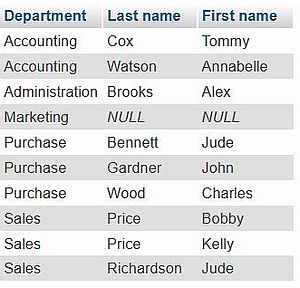 |
The dataset return includes now all departments, even those that haven't (yet) been any employees affected to. In this latter case, the values of the fields of the "employees" table are set to NULL in the query result dataset.
Full joins.
Definition:
| A full join between two tables returns all records that have a match in either the left or the right table. |
Whereas, for example, Oracle Database supports the FULL OUTER JOIN clause for this type of join, there is no way to directly code a full join in MySQL/MariaDB (in fact, OUTER is not defined, and using FULL JOIN seems to return the same dataset as does INNER JOIN). As a full join actually is a combination of a left and a right join, we can perform a full join on two tables by merging the datasets returned by performing a left and a right join, using the UNION clause.
SQL for the employees with the name of the department, that they are affected to (records ordered by department):
SELECT department_name AS 'Department', employee_lname AS 'Last name', employee_fname AS 'First name'
FROM employees
LEFT JOIN departments
ON employees.employee_department = departments.department_id
UNION SELECT department_name AS 'Department', employee_lname AS 'Last name', employee_fname AS 'First name'
FROM employees
RIGHT JOIN departments
ON employees.employee_department = departments.department_id
ORDER BY 'Department', 'Last name', 'First name';
The screenshot shows the query output:
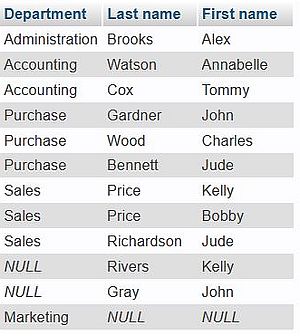 |
The dataset returned includes now all employees, even those who haven't (yet) been affected to a department, as well as all departments, even those that haven't (yet) been any employees affected to.
Note: With the SQL, as used here, the order of the records returned is not really what we wanted. No idea why, nor how to solve this issue (?).
Cross joins.
Definition:
| A cross join between two tables returns all records that match every row of the first table with every row of the second table. |
The dataset returned is, in fact, nothing else than the Cartesian product of the two tables. I don't not really see in what situations this could be useful. Anyway, performing a cross join with the tables of our "company" database doesn't make any sense.
To note that retrieving data from two tables, without defining a common column relationship using the WHERE clause (cf. very first example of the tutorial), also returns the Cartesian product of the two tables.
Self joins.
Definition:
| A self join is a type of join in which a table is joined to itself. |
This type of join is useful when you need to compare rows within the same table. A typical example is retrieving data, that relates employees to their manager in an organizational hierarchy.
Self joins cannot be coded directly. You'll have to use a query similar to one of those, that you would use with two different tables (query with either a WHERE clause, or one of the JOIN clauses). Also, it is mandatory to use table aliases to assign the table different names within the same query.
In order to learn about self joins, let's add the column employee_manager to the "employees" table, and fill in the value of this field for some employees. Here is the
SQL (file "manager.sql" in the download archive).
ALTER TABLE employees ADD employee_manager INT NULL DEFAULT NULL AFTER employee_department;
UPDATE employees SET employee_manager = 10 WHERE employee_id = 20;
UPDATE employees SET employee_manager = 10 WHERE employee_id = 21;
UPDATE employees SET employee_manager = 10 WHERE employee_id = 31;
UPDATE employees SET employee_manager = 10 WHERE employee_id = 40;
UPDATE employees SET employee_manager = 31 WHERE employee_id = 30;
UPDATE employees SET employee_manager = 31 WHERE employee_id = 32;
UPDATE employees SET employee_manager = 40 WHERE employee_id = 41;
UPDATE employees SET employee_manager = 40 WHERE employee_id = 42;
The screenshot shows the content of the modified "employees" table.
![SQL Joins: Sample database table content [3]](../screenshots/sql_joins7.jpg "SQL Joins: Sample database table content [3]") |
Let's create a query to display the employees with the name of their manager using the WHERE clause. Here is the code:
SELECT a.employee_lname AS 'Employee last name', a.employee_fname AS 'Employee first name', b.employee_lname AS 'Manager last name', b.employee_fname
AS 'Manager first name'
FROM employees a, employees b
WHERE a.employee_manager = b.employee_id
ORDER BY a.employee_lname, a.employee_fname;
Note the usage of the table aliases "a" and "b", and how they are used as prefixes to the column names!
The screenshot shows the query output:
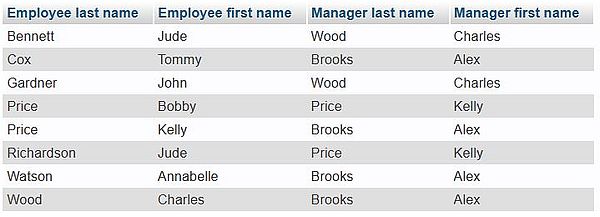 |
As expected, this query is similar to an inner join. Thus, only those employees, who have a manager (employee_manager field different from NULL) are displayed.
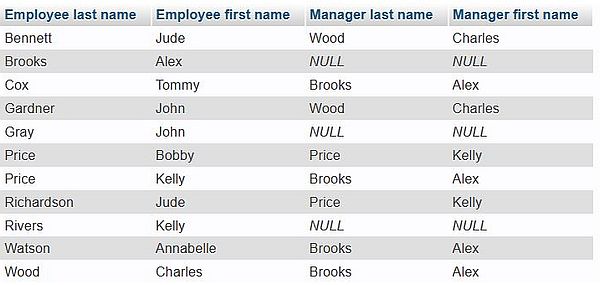
And to terminate the tutorial, let's create a query to display all employees with the name of their manager, including those who haven't a manager. This is done using the
LEFT JOIN clause. Here is the code:
SELECT a.employee_lname AS 'Employee last name', a.employee_fname AS 'Employee first name', b.employee_lname AS 'Manager last name', b.employee_fname
AS 'Manager first name'
FROM employees a
LEFT JOIN employees b
ON a.employee_manager = b.employee_id
ORDER BY a.employee_lname, a.employee_fname;
The screenshot shows the query output:
 |
If you find this text helpful, please, support me and this website by signing my guestbook.