| 1. |
Application description and prerequisites. |
| |
|
The aim of the application is to create a simple possibility to play MP3 files, stored on one computer of a local network, in the web browser
of all other computers on that network. Please, note that this is the description of the application (with download link of the files needed to run it on
your own webserver); the application is not available as online application on this website.
|
|
The title "Local network MP3 player" is in fact exaggerated and misleading. In fact, the application is not more (and not less) than two Perl
CGI scripts, the first one creating the directory listing of the Windows Music library (or any other directories), including
links to start the second script, that creates a webpage including code to embed the browser's HTML5 player, ready to play the MP3 file,
selected in the directory listing.
|
|
Besides the CGI related modules, the first script uses the module File::Find (that should
be installed by default with Strawberry Perl), and MP3::Tag, that you'll have to install
from CPAN. In order to read the play duration of the MP3 file, this module actually uses MP3::Info, that you'll also have to install.
|
|
As the webserver has to access files, located outside of its document directory, you'll have to modify the Apache configuration file
httpd.conf, creating one or more alias(es), and configuring the access permissions for the
directory (or directories), where the MP3 are stored.
|
My Windows Music library is actually made of 2 directories: the standard Windows "Music" folder, located at C:/Users/allu/Music ("allu" = user name), and
"E:/Music 2" (E: = an external USB disk, with the custom Music library). In order to use a URL starting with "/media1" for the first directory, and "/media2"
for the second one, here are my changes to httpd.conf:
Alias /media1 "C:/Users/allu/Music"
Alias /media2 "E:/Music 2"
<Directory "C:/Users/allu/Music">
Options Indexes FollowSymLinks
AllowOverride None
Require all granted
</Directory>
<Directory "E:/Music 2">
Options Indexes FollowSymLinks
AllowOverride None
Require all granted
</Directory>
|
|
Note: The application doesn't care if the USB drive E: is actually connected. If it isn't, only the files in the standard Music
library will be listed. However, trying to start Apache without E: being connected will result in a failure! This is obvious, as
httpd.conf contains a reference to a directory that does not exist. If your E: drive isn't normally connected, rebooting the computer will cause the startup of
Apache to fail. A work-around would be to comment out the alias and directory settings for the music library on E:, and removing the comments, connecting E: and
restarting Apache, in the case where you want to run the Local MP3 player web application. A more professional solution would be to
start Apache with a batch file, that overwrites httpd.conf with one of two files (one including the references to the music library on the E: drive, the other
without them), depending on E: being connected or not.
|
|
| 2. |
Application tailored for my system. |
| |
|
Several parts of the source code of the two Perl scripts are specific to my system, more exactly my way to store and name my MP3 files.
This means that, if you want to use the application on your local network, you'll have either to adapt the source code (what pre-supposes that you have knowledge
of the Perl programming language), or adapt the storage and naming of your MP3 files (what could be lots of work, if you have lots of them, otherwise it's probably
the better choice).
|
|
As the path to the MP3 files is defined in Apache's httpd.conf, you'll not have to deal with this in the Perl script. However, if
all your files are stored in one single main directory (for example, the standard Windows "Music" folder), or if they are stored in more than 2 directories,
the scripts will have to be adapted.
|
|
The major point to consider is that I group my MP3 files in what I call music categories. These are in fact artist
categories, in the sense that I consider all music performed by a given artist belonging to one of the following categories: "Classical", "Electronic",
"International", "Other", "Pop", "Progressive Rock", "Rock", and "Special". The webpage, created by the first Perl script, displays a combobox, where you can
choose one of these categories. If you don't want to reorganize your MP3 storage, the simplest way is probably to drop the combobox and display a list of all your
files. If you have a lot of them, you could, for example use a combobox with the letters from "A" to "Z", giving the possibility to the user to limit the list to
artists, whose names begin with a given letter.
|
|
The application code is tailored for the folder organization of my music libraries, as well as my naming convention
of the MP3 files. Here again, you'll have two possibilities: Either adapt my folder organization and rename your files, or modify the code to adapt to your
own system.
|
|
Each of my two music libraries contains a subdirectory for each of my music categories. These subdirectories either contain the
MP3 file (if the file is a full music album), or a subfolder with the MP3 files (if the files are music
tracks). The name of the subfolder is made of the artist name and the album name, separated by " - ". Example: "Grobschnitt - Rockpommel's Land".
|
|
Full album file names are made of the artist name and the album name, separated by " - ". Example: "Grobschnitt - Solar Music;
Live.mp3". Track file names are made of the artist name, the album name, and the track name preceded by a two digits track number
between parentheses, these three components being separated by " - ". Example: "Grobschnitt - Rockpommel's Land - (01) Ernie's Reise.mp3".
|
|
All MP3 files are supposed to have the title, artist, album, year, track number and genre MP3 tags set. Note that for my files,
the genre is actually set to the music category, the artist, who performs the album or track, belongs to. In the case of full album files, the title tag is set
to the album name, followed by "[Album]". Example: "Solar Music: Live [Album]"; the track number of my album files is set to "0". In the case of track files,
the Title tag is set to the track title. Example: "Ernie's Reise".
|
|
| 3. |
Using templates to create the webpages. |
| |
|
The two Perl scripts (stored in the /cgi-bin directory of the webserver), are respectively called "mp3player.pl" and "mp3player_play.pl". The webpages, that they
create are based on the files "lan_mp3_player1.template.html" and "lan_mp3_player2.template.html" respectively (supposed to be stored in the Apache document root).
These files contain a template of the webpage, that contains custom tags, that the Perl scripts replace by
some actual value, or some actual HTML code.
|
|
In the template files, lines containing such custom tags start with a number symbol (#). The tag names also start and end with number symbols.
|
Here is the code of the template lan_mp3_player1.template.html, used by the first script:
<html lang="en">
<head>
<meta http-equiv="content-type" content="text/html; charset=UTF-8"/>
<meta name="viewport" content="width=device-width, initial-scale=1"/>
<title>LAN MP3 Player - Select MP3</title>
<script language="javascript" type="text/javascript">
<!--
function playmp3(dir, cat, file) {
window.open('/cgi-bin/mp3player_play.pl?file="' + file + '"&cat="' + cat + '"&dir=' + dir, '',
'width=600, height=300, top=200 left=400 toolbar=no, location=no, directories=no, status=no, menubar=no, scrollbars=no, resizable=no, copyhistory=no');
}
//-->
</script>
<meta name="description" content="Free online application: Simple LAN MP3 Player - Select MP3 to play"/>
<meta name="keywords" content="MP3, music, audio, player, LAN, network, file list, MP3 list, selection, Perl, CGI, application, online, free"/>
</head>
<body>
<h2>LAN MP3 Player.</h2>
<form id="form1" name="form1" method="post" action="/cgi-bin/mp3player.pl">
<table border="0" style="margin-top:15px">
<tr><td style="font-weight:bold">Play MP3 files on any computer of the local network.</td></tr>
<tr><td style="padding-top:10px">Search for MP3 of given music category.</td></tr>
<tr><td style="padding-top:10px"><select name="category" id="category" style="margin-left:0px">
# <option value="1" #selected1#>Classical</option>
# <option value="2" #selected2#>Electronic</option>
# <option value="3" #selected3#>International</option>
# <option value="4" #selected4#>Other</option>
# <option value="5" #selected5#>Pop</option>
# <option value="6" #selected6#>Progressive Rock</option>
# <option value="7" #selected7#>Rock</option>
# <option value="8" #selected8#>Special</option>
</select></td></tr>
<tr><td style="padding-top:10px" align="center"><input type="submit" name="action" id="action" value="Search"/></td></tr>
</table>
</form>
# #table#
</body>
</html>
|
|
The custom tags used with the combobox items are necessary to mark the item actually selected by the user. The custom tag "#table#" will be replaced by the HTML
code of a table containing the list of the MP3 files for the music category selected.
|
And here is the code of the template lan_mp3_player2.template.html, used by the second script:
<html lang="en">
<head>
<meta http-equiv="content-type" content="text/html; charset=UTF-8"/>
<meta name="viewport" content="width=device-width, initial-scale=1"/>
<title>LAN MP3 Player - Play MP3</title>
<meta name="description" content="Free online application: Simple LAN MP3 Player - Play MP3 selected"/>
<meta name="keywords" content="MP3, music, audio, player, LAN, network, play, listen, Perl, CGI, application, online, free"/>
</head>
<body>
<h2>LAN MP3 Player.</h2><br/>
<table border="0" width="100%">
# <tr><td align="center">Listen to:<br/>#mp3file#</td></tr>
<tr><td> </td></tr>
<tr><td align="center">
<audio
controls
width="400"
# src="#dir##file#">
</audio>
</td></tr>
<tr><td> </td></tr>
<tr><td> </td></tr>
<tr><td align="center">
<a href="" onclick="window.close();return false;">Close this window</a>
</td></tr>
</table>
</body>
</html>
|
|
There are two custom tags, that will be replaced by the second Perl script: the name of the MP3 that will be played, and the server URL to access this file.
|
|
| 4. |
Displaying the MP3 list. |
| |
|
The first script (the one with which the application is started) displays a webpage with a combobox from which the user can choose one of the music categories,
and a button, that the user can use to search the music libraries for MP3 files related to the category selected. Except for the case, when the script is
initially started (i.e. the case, where there hasn't yet been a button push), a list of the MP3 files found (or a message that no files have been found) is
also displayed.
|
Here is the code of my script mp3player.pl:
#!C:/Programs/Strawberry/win64/perl/bin/perl.exe -I"."
use strict; use warnings;
use CGI;
use CGI::Carp "fatalsToBrowser";
use File::Find;
use MP3::Tag;
my $cgi = new CGI;
print "Content-Type: text/html\n\n";
print '<!DOCTYPE html>', "\n\n";
my $app_dir = "C:/Programs/Apache24/htdocs";
my @categories = (
'', 'Classical', 'Electronic', 'International', 'Other', 'Pop', 'Progressive Rock', 'Rock', 'Special'
);
my %params = $cgi->Vars;
my $action = lc($params{'action'});
$action = 'init' unless ($action);
my $category; my @mp3paths; my @mp3files;
if ($action eq 'init' or $action eq 'search') {
if ($action eq 'init') {
$category = 1;
}
else {
$category = $params{'category'};
my @dirs = ("C:/Users/allu/Music/$categories[$category]", "E:/Music 2/$categories[$category]");
find(\&apm;mp3list, @dirs);
my $dir; my $file;
foreach my $path (@mp3paths) {
if (substr($path, 0, 1) eq 'C') {
$dir = 1;
}
else {
$dir = 2;
}
$file = $path; $file =~ s/(.*\/)+//g; $file =~ s/'/APOS/g; $file =~ s/&/AMP/g; $file =~ s/;/COLON/g;
$file .= '--' . $path . '--' . $dir;
push(@mp3files, $file);
}
@mp3files = sort {$a cmp $b} @mp3files;
}
my $template = "$app_dir/lan_mp3_player1.template.html";
open(my $input, "<", $template)
or die "Can't open template file $template: $!";
my @lines = <$input>;
close($input);
foreach my $line (@lines) {
chomp($line);
if ($line) {
if (substr($line, 0, 1) eq '#') {
$line = substr($line, 1);
for (my $i = 1; $i <= 8; $i++) {
my $sel = '#selected' . $i . '#';
if ($line =~ /$sel/) {
if ($i == $category) {
$line =~ s/$sel/selected="selected"/;
}
else {
$line =~ s/$sel//;
}
}
}
if ($line =~ /#table#/) {
if ($action eq 'init') {
$line =~ s/#table#//;
}
else {
my $table;
if (scalar @mp3files == 0) {
$table = '<p>Sorry, no MP3 files found...</p>';
}
else {
my @format = qw(=>s ?Hh ?{mL}m {SML}s);
$table = '<table style="margin-top:15px" border="1">';
$table .= '<tr>';
$table .= '<th style="padding:5px">Artist</th>';
$table .= '<th style="padding:5px">Album</th>';
$table .= '<th style="padding:5px">Year</th>';
$table .= '<th style="padding:5px">Track number and title</th>';
$table .= '<th style="padding:5px">Duration</th>';
$table .= '<th style="padding:5px">MP3 player</th>';
$table .= '</tr>';
foreach my $mp3file (@mp3files) {
my ($file, $path, $dir) = split('--', $mp3file);
my $mp3 = MP3::Tag->new($path);
my ($title, $track, $artist, $album, $comment, $year, $genre) = $mp3->autoinfo();
$table .= '<tr>';
$table .= '<td style="padding:5px">' . $artist . '</td>';
$table .= '<td style="padding:5px">' . $album . '</td>';
$table .= '<td style="padding:5px">' . $year . '</td>';
if ($track == 0) {
$table .= '<td style="padding:5px"> </td>';
}
else {
$table .= '<td style="padding:5px">(' . sprintf('%02d', $track) . ') ' . $title . '</td>';
}
$table .= '<td style="padding:5px" align="right">' . $mp3->format_time($mp3->total_secs(), @format) . '</td>';
if ($track == 0) {
$table .= '<td style="padding:5px"><a href="javascript:playmp3(' . $dir . ', ' . "'$categories[$category]'" . ', ' . "'$file'" . ')">play full album</a></td>';
}
else {
$table .= '<td style="padding:5px"><a href="javascript:playmp3(' . $dir . ', ' . "'$categories[$category]'" . ', ' . "'$file'" . ')">play this track</a></td>';
}
$table .= '</tr>';
}
$table .= '</table>';
}
$line =~ s/#table#/$table/;
}
}
}
unless ($line =~ /#/) {
print "$line\n";
}
}
}
}
sub mp3list {
my $file = $File::Find::name;
return unless -f and $file =~ /(\.mp3)$/;
push(@mp3paths, $file);
}
|
|
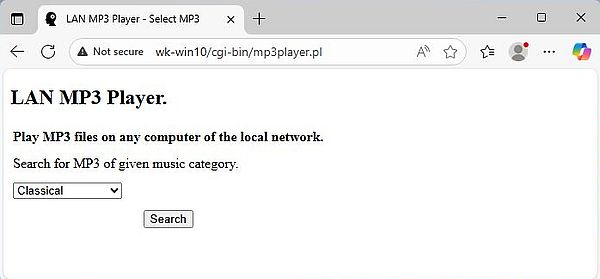
The application is launched by entering http://<computer-name>/cgi-bin/mp3player.pl (if you have running a DNS server on your local
network), or http://<ip-address>/cgi-bin/mp3player.pl (if the name of the computer that runs the webserver cannot be resolved). This
is equivalent to calling the script with the parameter action set to "init". The website created (based on template file
lan_mp3_player1.template.html), will contain the combobox with the music categories and the "Search" button, to search for MP3 files
corresponding to this category.
|
The screenshot shows the application entry page in Microsoft Edge on Windows 11. In the URL http://wk-win10/cgi-bin/mp3player.pl,
"wk-win10" is the computer name of my Windows 10 laptop, where Apache is running.
|
|
|
|
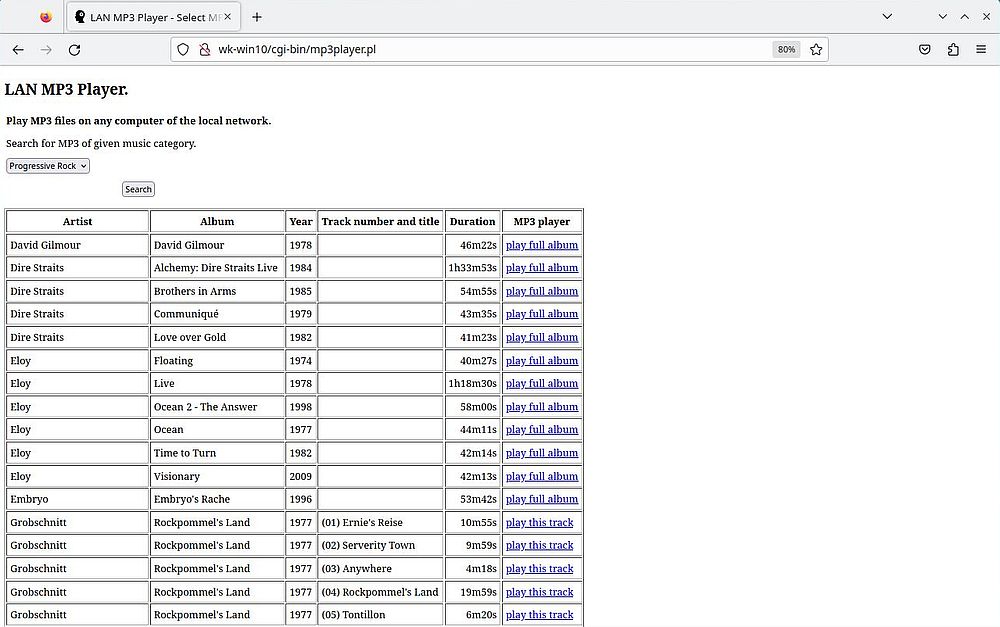
When the user pushes the "Search" button, the script mp3player.pl is called with the parameter action set to
"search". The script searches the music libraries (using File::Find) for MP3 files located in the subdirectories with same name as the music category selected.
This list is then sorted and displayed as a HTML table, containing information about the MP3 files (information extracted from the MP3 files using MP3::Tag), as
well as links to play the files.
|
|
The screenshot shows (a part of) the list of my "Progressive Rock" MP3 files in Firefox, running on Kubuntu 23.04.
|
|
|
|
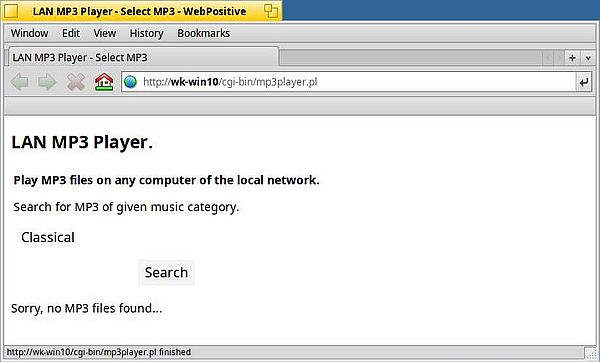
And here is the script output when no MP3 files for the selected category are found (I actually renamed the files in the "Classical" subdirectory using
the .bak extension). The screenshot has been taken on Haiku R1 beta5, running the WebPositive browser.
|
|
|
|
The links actually launch the Javascript function defined in the header of lan_mp3_player1.template.html. This function opens a new
browser window, and in this window, executes the script mp3player_play.pl, passing to it the parameters, that were passed as arguments.
|
The parameters passed to mp3player_play.pl are the following:
- dir: An identifier related to the music library: 1 = the standard Windows Music library; 2 = my custom
music library on the E: drive.
- cat: The music category, that also identifies the subdirectory within the music library, where the
MP3 file is actually stored.
- file: The name of the MP3 file. This parameter may cause trouble, as the filename may contain
characters, that have a special meaning in the interpretation of an URL. The problematic characters are: the ampersand (&), the apostrophe ('), and the
semicolon (;). To prevent the issues, I replace them by the text values AMP, APOS, and SCOL respectively.
Examples of the URL, used to launch the script mp3player_play.pl:
http://wk-win10/cgi-bin/mp3player_play.pl?file="Manfred MannAPOSs Earth Band - Nightingales AMP Bombers.mp3"&cat="Progressive Rock"&dir=1
http://wk-win10/cgi-bin/mp3player_play.pl?file="Grobschnitt - RockpommelAPOSs Land - (02) Serverity Town.mp3"&cat="Progressive Rock"&dir=1
|
Some further notes concerning the code of mp3player.pl:
- The files returned by the File::Find subroutine are sorted by the filename without path. With my naming convention of the MP3 files
this results of a sort first by artist name, then by album title, and finally (if the file is a track file) by track number, and this independently of the music
library, where the files are located.
- Whereas the URL is constructed using the file name, the MP3 information displayed in the table is extracted from the MP3 tags of
the file. It is supposed that the tags concerned are all correctly set.
- To distinguish album and track files, the script relies on the track number MP3 tag, that in my files is set to "0" if the file
is a full album.
|
|
| 5. |
Playing the MP3 file. |
| |
|
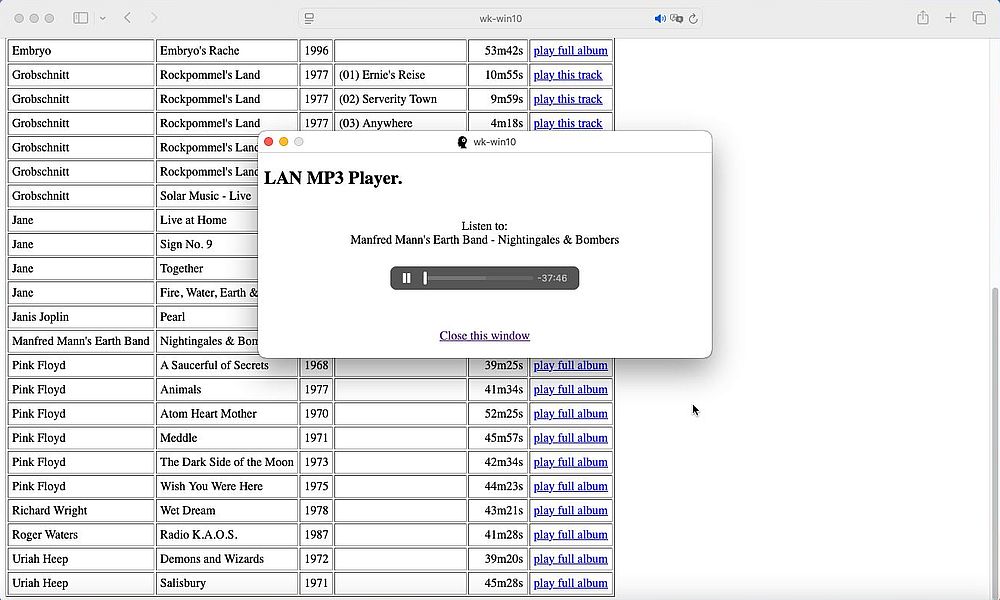
Clicking one of the links in the MP3 list, displayed by the script mp3player.pl, results in the execution of the Javascript function
playmp3, that runs the script mp3player_play.pl in a new window. This script creates a webpage, based on
the template lan_mp3_player2.template.html. It essentially consists of an embedded HTML player, the src
attribute of the <audio> element being set to the URL of the MP3 to be played. This URL is build using the parameters that are
passed when the script is invoked.
|
Here is the code of my script mp3player_play.pl:
#!C:/Programs/Strawberry/win64/perl/bin/perl.exe -I"."
use strict; use warnings;
use CGI;
use CGI::Carp "fatalsToBrowser";
my $cgi = new CGI;
print "Content-Type: text/html\n\n";
print '<!DOCTYPE html>', "\n\n";
my $app_dir = "C:/Programs/Apache24/htdocs";
my %params = $cgi->Vars;
my $dir = $params{'dir'};
$dir = 1 unless $dir;
my $file = $params{'file'}; my $file = $params{'file'}; $file =~ s/[\<\>\&\/\\"]//g;
$file =~ s/APOS/'/g; $file =~ s/AMP/&/g; $file =~ s/SCOL/;/g;
my $category = $params{'cat'}; $category =~ s/[^a-zA-Z\s]//g;
if ($file and $category and ($dir == 1 or $dir == 2)) {
my $template = "$app_dir/lan_mp3_player2.template.html";
open(my $input, "<", $template)
or die "Can't open template file $template: $!";
my @lines = <$input>;
close($input);
foreach my $line (@lines) {
chomp($line);
if ($line) {
if (substr($line, 0, 1) eq '#') {
$line = substr($line, 1);
if ($line =~ /#mp3file#/) {
my $f = $file; $f =~ s/\.mp3//g; $f =~ s/;/:/g;
$line =~ s/#mp3file#/$f/;
}
elsif ($line =~ /#dir##file#/) {
my ($artist, $album, $track) = split(' - ', $file);
my $media = '/media' . $dir . '/' . $category . '/';
if ($track) {
$media .= $artist . ' - ' . $album . '/';
}
$media .= $file;
$line =~ s/#dir##file#/$media/;
}
}
unless ($line =~ /#/) {
print "$line\n";
}
}
}
}
|
|
The screenshot shows the output of script mp3player_play.pl in Safari, running on macOS 15.
|
|
|
|
All that the script does is replacing 2 of my custom tags with their actual value.
|
|
The first tag concerns the "Listen to" string, where the artist name, the album title, and (if the file is a track file) the
track number and title are inserted. This is nothing else than the value of the "file" parameter - where we replace the text values "APOS", "AMP", "SCOL"
by an apostrophe ('), an ampersand (&), and a semicolon (;) respectively) - with 2 modifications. First the file extension is removed. Second semicolons
are transformed into colons. This is again specific to my MP3 naming convention: As colons are not allowed in file names, I replace the colons in album and
track titles with a semicolon in the filename.
|
|
The second tag concerns the URL of the MP3 file, that has to be set as src attribute of the
<audio> element. This URL is based on the aliases, that we defined in httpd.conf. The URL starts with either "/media1/" or
"/media2/", where the number is given by the "dir" parameter. The subfolder name is the same as the name of the music category, and it is given by the "cat"
parameter. Finally, we split the filename (parameter "file") into its components: artist name, album title, track title. If there is no track title (album file),
all we have to do to complete the URL string is to add the filename. In the case of a track file, the MP3 is located in a subfolder with the same name as the
album title, and we have to insert the album title into the URL string, before inserting the filename.
|
|
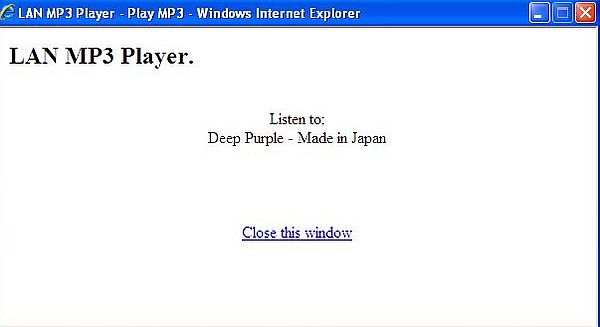
It's obvious that the application only works with web browsers that support HTML5. The screenshot below shows the script output on Windows XP, running Internet
Explorer 8.
|
|
|
|
| 6. |
Application download. |
| |
|
Click the following link to download the application files. The ZIP file contains everything that you
need to run the application on your own webserver. Please, have a look at the included Readme.txt file for information where to store
the different files.
|
|